Binary ↔ Hex Converter
Binary Input
Hexadecimal Output
Conversion Information
How to use this converter
- Enter binary digits (0 and 1) in the left panel
- The hexadecimal equivalent will appear automatically in the right panel
- You can include spaces for better readability (they’ll be ignored)
- Click the Swap button to convert Hex to Binary
- Click the Clear button to reset both fields
Binary to Hexadecimal Conversion
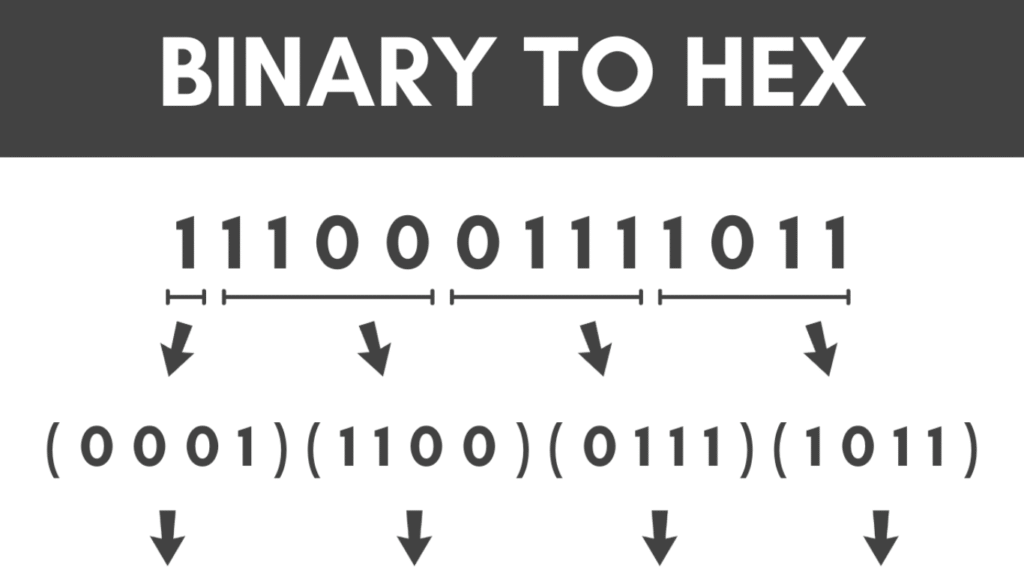
Binary to hexadecimal conversion is done by grouping binary digits into sets of four (starting from the right) and then converting each group to its hexadecimal equivalent.
| Binary | Hexadecimal |
|---|---|
| 0000 | 0 |
| 0001 | 1 |
| 0010 | 2 |
| 0011 | 3 |
| 0100 | 4 |
| 0101 | 5 |
| 0110 | 6 |
| 0111 | 7 |
| 1000 | 8 |
| 1001 | 9 |
| 1010 | A |
| 1011 | B |
| 1100 | C |
| 1101 | D |
| 1110 | E |
| 1111 | F |
✅ What is Binary to Hex Conversion?
Binary to Hex conversion is the process of transforming a binary number (base-2) into its hexadecimal (base-16) equivalent. Binary is the language of computers, consisting only of 0s and 1s, whereas hexadecimal is a compact, human-readable system using 0–9 and A–F.
For example:
- Binary:
11010111 - Hex:
D7
Because 4 binary digits (bits) perfectly map to one hexadecimal digit, converting between them is quick and efficient—making hex ideal for debugging, memory addresses, and low-level programming.
🔄 How Binary and Hexadecimal Systems Work
🧮 Binary (Base-2)
- Uses only 0 and 1
- Each digit is a power of 2
- Common in computer hardware, logic gates, microprocessors
Example:1010 (binary) = 1×8 + 0×4 + 1×2 + 0×1 = 10 (decimal)
🔢 Hexadecimal (Base-16)
- Uses digits: 0-9 and letters A-F
- Easier to read and write than binary
- Often used in memory locations, CSS color codes, assembly code
Example:A (hex) = 10 (decimal)1F (hex) = 1×16 + 15 = 31 (decimal)
🧠 How to Convert Binary to Hex Manually
- Group the Binary Digits into 4-bit chunks (from right to left):
Example:11011110→1101 1110 - Convert Each Group into its Hex Equivalent Using the Table Below:
| Binary | Hex |
|---|---|
| 0000 | 0 |
| 0001 | 1 |
| 0010 | 2 |
| 0011 | 3 |
| 0100 | 4 |
| 0101 | 5 |
| 0110 | 6 |
| 0111 | 7 |
| 1000 | 8 |
| 1001 | 9 |
| 1010 | A |
| 1011 | B |
| 1100 | C |
| 1101 | D |
| 1110 | E |
| 1111 | F |
- Write Down the Hex Number:
1101 1110 → D E → DE
🧰 Binary to Hex Converter Tool – Features
Using an online Binary to Hex Converter simplifies the process:
✅ Accepts large binary values
✅ Real-time conversion
✅ 100% accurate output
✅ Mobile and desktop-friendly
✅ No download or registration needed
🟢 Try it now on converthelping.com/binary-to-hex
📌 Practical Use Cases
🖥️ 1. Programming & Debugging
Programmers use hex to shorten binary sequences. It simplifies understanding memory dumps and machine-level data.
🎮 2. Game Development
Hex values are used in object properties, physics engines, and shader memory locations.
🧪 3. Computer Architecture
Processors use hexadecimal to represent machine code instructions, registers, and hardware addresses.
🎨 4. Web Development
Hex codes define color values in HTML and CSS (e.g., #FFFFFF for white).
🔗 Related Conversions You Should Know
For a complete understanding of number systems, check out these tools:
- Hex to Binary Converter
- Binary to Decimal Converter
- Binary to Octal Converter
- Decimal to Hex Converter
These conversions are all interconnected and essential for digital electronics and software engineering.
🧠 Pro Tip
When converting a long binary string, always pad the beginning with zeros (if needed) so it divides evenly into 4-bit groups.
Example:
Binary: 110101 → Add 2 zeros → 0011 0101 → Hex: 35
📖 Summary
| Binary | Grouped Binary | Hex |
|---|---|---|
| 1101 | 1101 | D |
| 11011110 | 1101 1110 | DE |
| 101101101001 | 0010 1101 1010 01 → pad to 0010 1101 1010 0100 | 2D A4 |
📌 Final Thoughts
Binary to Hex conversion plays a vital role in making complex binary data more manageable and readable. Whether you’re a software developer, computer science student, or electronics hobbyist, mastering this conversion opens the door to deeper system-level understanding.
🟢 Start converting today with our fast and reliable Binary to Hex tool at
👉 converthelping.com/binary-to-hex